Process
A program under execution is called a process. A program is a passive entity and a process is an active entity.
Components of a Process
Every process has the following entities compulsorily,
- Address Space
- CPU State
- OS Resources
Address Space of a Process
The range of virtual addresses that the operating system assigns to a user or separately running program is called an address ****space. This is the area of contiguous virtual addresses available for executing instructions and storing data. The range of virtual addresses in an address space starts at zero and can extend to the highest address permitted by the operating system architecture.
By default in 32-bit architecture the operating system assigns 2³² bytes of space to a process which is 4GB approximately.
CPU State
This consists of information about all the registers associated with a particular process.
Example:
a = b+c
mov b to ax
add c to ax
mov ax to a
OS Resources
The OS Resources consists of open-sockets and open-files.
The open-files consists of,
stdinstdoutstderr
The open-sockets consists of.
File ifothers
Representation of a Process in a Operating System
In operating system each process is associated with Process Control Block or (PCB). The process control block consists of the following items which are listed below,
- Process ID- Each process is associated with a Process ID which is unique for every process. This ID can be used to identify a process from others. The process ID is assigned by the operating system to a process when the process is created.
- Parent Process ID- The Process ID of the parent process that creates the current process is called the Parent Process ID. The first process that is created when a computer boots up is called the
init process and it has an process ID of zero.
- CPU State- This consists of information of all the registers associated with a process.
- Process State- This refers to the current state of the process. A process can be in ready state, running state, terminated state, block suspend state or ready suspend state.
- Scheduling Information- This consists information about the priority of the specific process.
- Memory Information- This consists of information about the memory space associated with a process. This tells us about the amount of RAM used by the process.
- Open-Files- They consists of the following as discussed earlier,
stdinstdoutstderr
Note:
- When we create a process the terminal becomes its parent.
- The content of the PCB is called context.
- PCB is always in the memory area.
- PC- Stands for program counter is used to point to the next program.
- IC- Stands for instruction counter is used to point to the next instruction.
fork() system call in C is used to create a new process by duplicating the calling process. It creates a new process called the child process. The child process is a copy of the parent process, except for the returned value and some other minor differences (e.g., different process IDs).
- In the Parent Process:
fork() returns the process ID (PID) of the child process.
- In the Child Process:
fork() returns 0.
- On Failure:
fork() returns 1 in the parent process, and no child process is created. Additionally, the global variable errno is set to indicate the error.
- When multiple instance of a process is created the,
program code along with data section and stack gets copied. Each instance of a process has its own independant memory so any changes to the memory in one instance dosenot afftect the other process.
wait() is a system call that suspends the calling process until one of its child process terminates. The wait() retreives the child’s exit status and returns it to the parent. Zero means that the child has died successfully, 1 means the child has died in a unexpected way and greater than one means some issue.- Orphan Process- Process whose parent has terminated leaving the child process still runnning is called orphan process. When a process becomes orphan the
init process adopts the process.
- Zombie Process- When the child process is terminated and the parent is busy with some other work then in that scenario the process becomes Zombie Process.
Communication Between Process
Piping in OS is a technique for interprocess communication in which the output for one process serves as an input to the another process. It works by creating a channel for the data to flow from one process to another.
State Transition Diagram for a Process

Schedulers in Operating Systems
- Short Term Scheduler- Its main function is to select a process out of many available processes in the ready queue to allocate the CPU. Move process from ready queue to running queue.
- Long Term Scheduler- Its main function is to move process from job queue to the ready queue. It is responsible for bringing a combination of CPU job and IO job.
- Mid Term Scheduler- Its main function is to swap in and swap out processes between the RAM and HDD. Swaps out the process which less priority and more memory requirements.
Context Switching
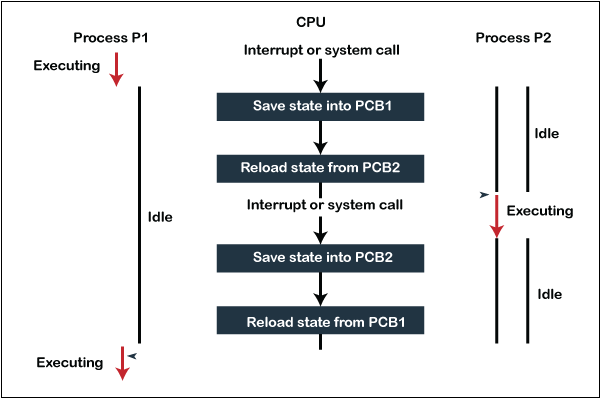
Context switching is the process of storing the state of a currently running process or thread so that it can be resumed later, and then loading the state of the next process or thread to be executed by the CPU. This allows multiple processes to share a single CPU, giving the illusion that they are running simultaneously.
When context switching occurs the OS saves state of a process, the registers associated and the stack in the PCB of the process.
Threads
Thread is the light weight version of a process having the same address space as per the parent process. Since a thread uses the address space of the parent hence the thread takes less space than a process. Each thread has their own thread control block.
In threads they have their own stack. They cannot share local variables but can share global variables.
For threads the chances of context switching is less if they belong to the same parent. If a thread makes an I/O the entire process goes to a waiting state and the next process comes.
Types of Threads
- User Level Threads- They are threads that are created by the user and runs in the user mode and they have less privileges and less resources than kernel level thread.
- Kernel Level Threads- They are threads that are created by the system hence they are also called the system threads. They run in kernal mode and hence they have more privileged access and resources.
Scheduling Algorithms in Operating Systems
In operating systems, scheduling algorithms are essential for managing the execution of processes. These algorithms determine which process will run at any given time, optimizing for various performance metrics such as response time, throughput, and CPU utilization. Below are descriptions of some commonly used scheduling algorithms:
First-Come, First-Served (FCFS)
- Description: FCFS is the simplest scheduling algorithm where processes are executed in the order they arrive in the ready queue.
- Advantages: Easy to implement and understand.
- Disadvantages: Can lead to the convoy effect, where short processes are delayed by longer ones, leading to poor utilization and increased average waiting time.
Convoy Effect
- Description: The convoy effect occurs in FCFS scheduling when a long process occupies the CPU, causing all shorter processes behind it to wait. This results in decreased system efficiency and increased average waiting time.
Shortest Job First (SJF)
- Description: SJF selects the process with the shortest execution time to run next.
- Advantages: Minimizes average waiting time and is optimal if all jobs are available simultaneously.
- Disadvantages: Not practical for interactive systems and can cause starvation of longer processes.
Shortest Remaining Time First (SRTF)
- Description: SRTF is a preemptive version of SJF, where the process with the smallest amount of time remaining until completion is selected to run next.
- Advantages: Further reduces average waiting time compared to SJF.
- Disadvantages: Similar to SJF, it can lead to starvation of longer processes.
Priority Scheduling
- Description: Processes are assigned a priority, and the process with the highest priority is executed first. Priorities can be static or dynamic.
- Advantages: Can provide good response time for high-priority processes.
- Disadvantages: May lead to starvation where low-priority processes are never executed.
Starvation
- Description: Starvation occurs when a process is perpetually delayed because other higher-priority processes continually take precedence. This is a significant issue in priority-based scheduling algorithms.
Round Robin (RR)
- Description: RR assigns a fixed time unit per process and cycles through them in the ready queue. Each process is given a small time slice (quantum), and if it doesn’t finish during this quantum, it is placed at the end of the queue.
- Advantages: Fair and ensures no starvation. Good for time-sharing systems.
- Disadvantages: Choosing the right time quantum is critical. Too short can lead to high overhead, too long can degrade into FCFS.
Multilevel Queue Scheduling
- Description: Processes are divided into different queues based on their priority or type (e.g., foreground vs. background). Each queue can have its own scheduling algorithm, and queues themselves are scheduled with a higher-level algorithm.
- Advantages: Flexible and can handle a variety of process types and priorities.
- Disadvantages: Complex to implement and manage.
Multilevel Feedback Queue Scheduling
- Description: An extension of multilevel queue scheduling, this algorithm allows processes to move between queues based on their behavior and requirements. Typically, a process that uses too much CPU time is moved to a lower-priority queue, while processes that wait too long can be moved to a higher-priority queue.
- Advantages: Dynamically adjusts to changing process behavior, improving responsiveness and CPU utilization.
- Disadvantages: Complex to implement and fine-tune.